

Export your .fig file
Save a local copy from Figma: the one file Lazy UIs needs, and the exports that don't work.
Lazy UIs reads Figma's own file format, .fig, which holds every layer, font, effect, and component exactly as you designed them. Figma saves one with Save local copy, in the desktop app and in the browser.
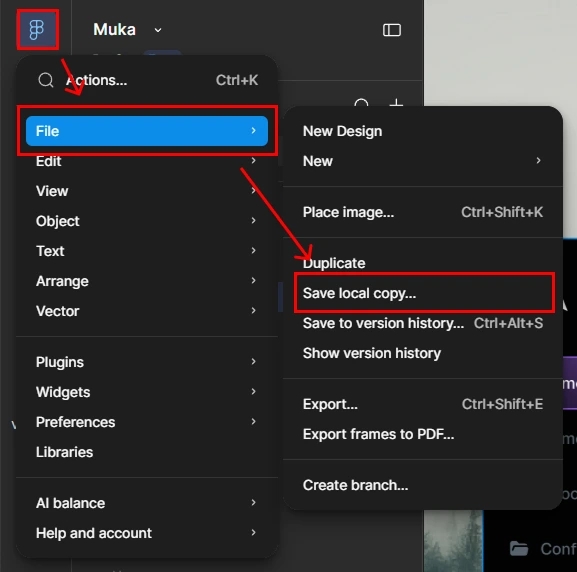
- 1Open the main menu
Click the Figma logo in the top-left corner of your design.
- 2Choose File → Save local copy…
Figma downloads the whole file as
Your design.fig. - 3Upload it
On the New conversion page, drop the file in or click to choose it. Files up to 512 MB work.

Upload the whole file
Keep everything the frame needs in the file you save: its screens, popups, and page frames on the same page, and the main components its instances come from (they may live on any page). You pick which frame to convert after uploading, so there's no need to delete anything first.